


PixVisualize: show it, don’t just tell it
Showcase your products, services and achievements with an interactive Before / After slider your visitors can drag themselves. E-commerce, photo retouching, renovation, beauty, real estate and much more: present your transformations clearly and engagingly, on your product pages and across your site. Enjoy the essential features for free, with Pro options to go further in customization.
They show it, their customers believe it
Four fields where Before / After imagery sells on your behalf.

WooCommerce e-commerce
Product page with Before / After gallery across 14 slots: quality is visible, carts fill up.

Photographers & retouchers
Prove your eye: display the retouching before/after large, visitors drag the slider and see the work.

Renovation & construction
Worksites, painting, fit-outs: contrast sells the quote before the first call.

Beauty & aesthetics
Skincare, makeup, cosmetic surgery: visible results build trust and trigger bookings.
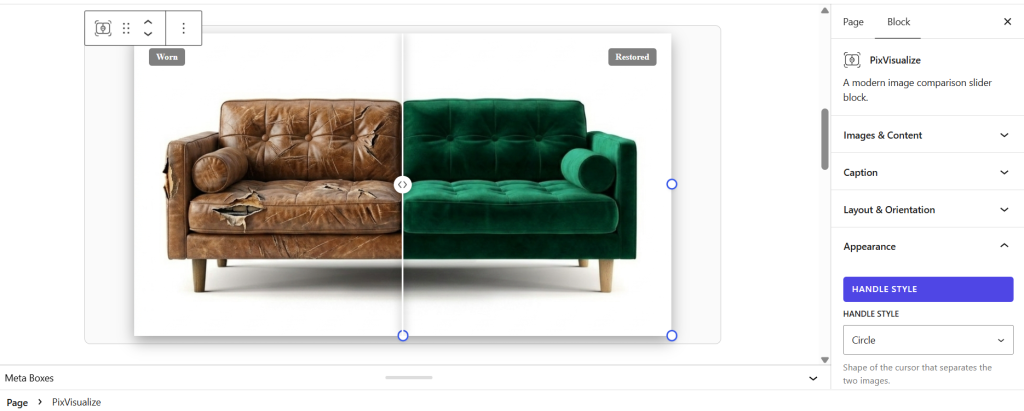
Total visual control
Lightweight, fast, hassle-free: your pages stay smooth, your sliders render instantly, and everything is adjusted visually — without touching a single line of code.
Free or Pro: choose the plan that suits you.
Free for the essential features — Pro to unlock even more possibilities.
| Features | Free version | Pro version |
|---|---|---|
| Before and After images | Included | Included |
| Before / After labels | Included | Included |
| Horizontal comparison | Included | Included |
| Essential Gutenberg block | Included | Included |
| Essential Elementor widget | Included | Included |
| Horizontal and vertical comparison | Not included | Included |
| Customizable ratios for desktop, tablet, and mobile | Not included | Included |
| Shortcode + visual generator | Not included | Included |
| Custom handle + SVG | Not included | Included |
| Separator: thickness, color and shadow | Not included | Included |
| Advanced labels: position, typography and color | Not included | Included |
| Fully customizable container | Not included | Included |
| Hover mode with cursor tracking | Not included | Included |
| Auto-scan on load | Not included | Included |
| Magnifier with 1.5x to 4x zoom | Not included | Included |
| WooCommerce gallery — multiple placements | Not included | Included |
Ready to show the difference?
Get PixVisualize and give your visitors a new way to see your results.